Trading Partner Management
The Trading Partner Management page (Manage > Trading Partner Management) is used to view, add, and edit Trading Partner and Processing Group components. This page provides the capability to make changes to these components to users who do not have access to the Build page.
Trading Partner Management is visible only if you have the Trading Partner Management role. When Branching and Merging is enabled on your account, you can select a branch to view trading partners and processing groups on that specific branch.
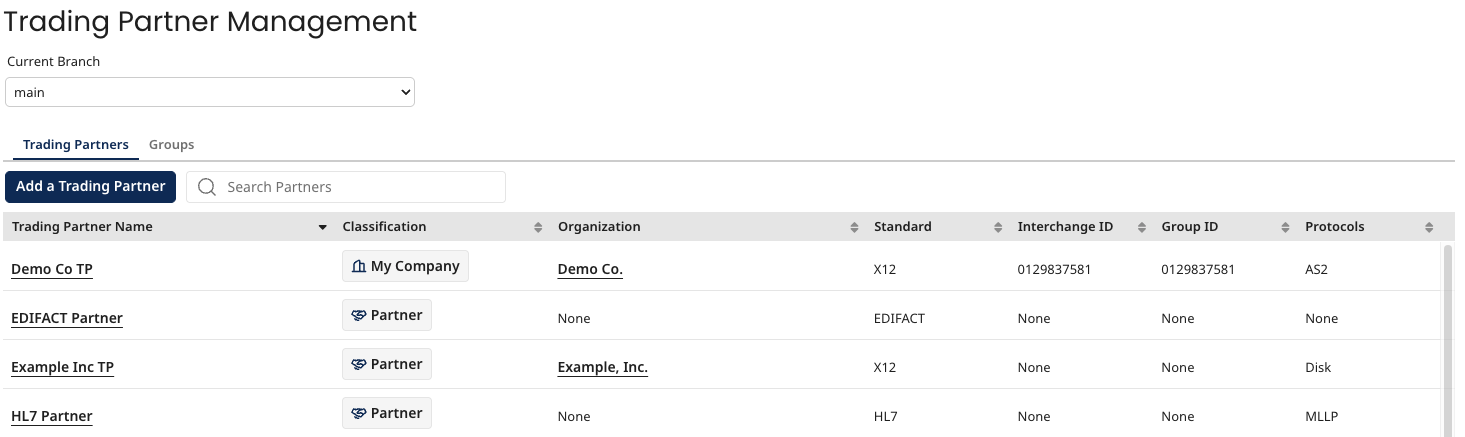
Trading Partners tab
The Trading Partners tab lists in a table the Trading Partner components (both my company and partners traded with) in the account with the following columns:
- Trading Partner Name - The name of the trading partner
- Classification - My company or a partner that you trade with
- Organization - The organization to which the trading partner belongs
- Standard - The standard used by the trading partner
- Interchange ID - The Interchange ID of the trading partner
- Group ID - The Group ID of the trading partner
- Protocols - The communication protocol(s) used by the trading partner
The Interchange ID and Group ID columns may be None for some Trading Partner components based on the age of component and associated document standard. When you open the component, a message that states "This component was automatically updated to support new platform features. Save to apply the changes." displays. Save the component so its values show up in Trading Partner management.
The table is sortable by any column; by default the table is sorted alphabetically by Trading Partner Name. You can search the list of trading partners by any field in the table.
To view and edit the details of an individual Trading Partner, click the name of the Trading Partner to open the component configuration dialog. You cannot change the standard.
To view and edit the details of an individual Organization, click the name of the Organization to open the Organization component in a new browser tab.
To add a Trading Partner, click Add a Trading Partner. The Create Component dialog opens with Trading Partner as the selected Type.
Groups tab
The Groups tab lists in a table all of the Processing Group components that are in the account. The columns are Group Name and Trading Partners. The Trading Partners column value is the number of Trading Partners in the Processing Group. The table is sortable by either column; by default the table is sorted alphabetically by Group Name.
To view and edit an individual Processing Group, click the Group Name to open the Processing Group component configuration dialog. If you make changes to the Processing Group, you must redeploy it.
To add a Processing Group, click Add Processing Group. The Create Component dialog opens with Processing Group as the selected Type.
Trading Partner Details panel
Clicking the name of trading partner opens the Trading Partner Details panel, which provides the configuration details of the selected trading partner.
- Overview
- Standard
- Contact Info
- Communication
- Archiving
- Where Used
You can view revision history details by clicking Revision History at the bottom of the panel.
